
Yes, many photo album apps will chronologically sort your photos for you. But I like to organize them chronologically on my computer’s filesystem so, in the absence of any additional program, I can find what I’m looking for.
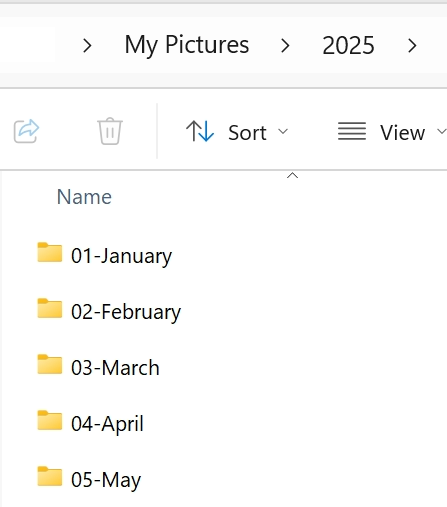
My wife and I both use Dropbox and all the photos we both take on our phones are moved to a shared Dropbox/Camera Uploads folder.
I then have a Windows Powershell script set up to run (as a Windows Scheduled Task) every night at 3am, which organizes our photos into Year (YYYY) Month (MM – Month) folders.
The nice thing about this is I don’t need to open Google Photos or similar app to find, say, Christmas, Summer or birthday photos. I just got to the corresponding month to find them.
When we first had our kids I was renaming the best of the best photos I took each month, so the photo filename had metadata in the file name. So instead of IMG_0556.JPG it was something like Macy Lila binkies pink.jpg. Yeah, OCD much 😆 This photo recognition capability is built into most photo apps these days. But, again, I can search my file system for binkies and find these photos.
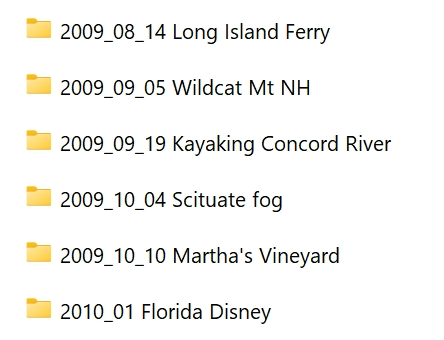
In addition to having photos automatically organized into Year/Month folders, I group special events into YYYY_MM_DD Event folders.
The nightly script I mentioned above only moves photos older than 30 days into Year/Month folders. This way I have time to group photos into Event folders. And we can both easily find recent photos in the Camera Uploads folder.
I see people organize things as MM-DD-YYYY. Don’t do that. They don’t sort correctly.
Geeky stuff
In 2018 when I first wrote my original photo organizing script, I used the NodeJS programming language. I hadn’t used that language before and I’m sure the script could have been written better, shorter. It was 275 lines of code, included a bunch of libraries (other code) to help make creating folders, subfolders, work with dates, etc. easier.
In 2025 I create a new script using Powershell, Windows scripting language, with the help of AI (Microsoft’s Copilot). The resulting 38 lines of code is very clean and only required some minor tweaking on my part to get it working correctly. It’s amazing how terrific AI has gotten at writing code.
Do it Yourself
The Powershell script and instructions for getting this working for yourself is here: https://github.com/seriousfunk/sort-photos